The Verdict
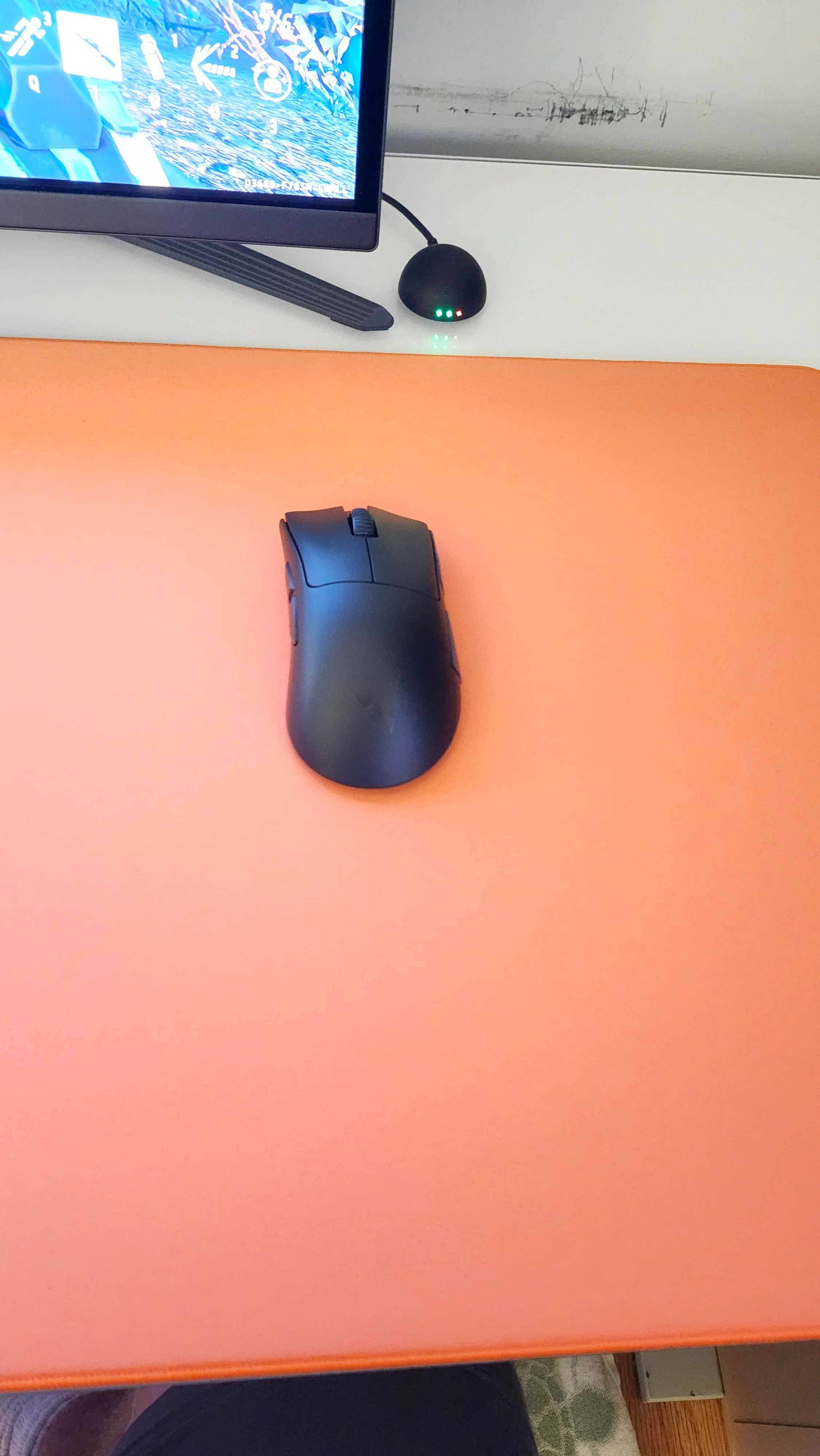
The DeathAdder V4 Pro is a genuinely excellent wireless gaming mouse: lighter, faster, and longer-lasting than the V3 Pro it replaces. But at $169.99 MSRP it now sits in the same bracket as the Logitech G Pro X Superlight 2 and Razer's own Viper V3 Pro, so it is a preference pick within that tier, not the budget standout it's sometimes described as.
Check Price on AmazonThe Good
- 56g to 58g depending on color, one of the lightest ergonomic wireless mice available
- Focus Pro 45K sensor with true 8000Hz polling in both wired and wireless modes
- Up to 150 hours of battery life at 1000Hz polling
- Comfortable right-handed ergonomic shape for palm and claw grips
- Optical scroll wheel and Gen-4 optical switches rated for 100 million clicks
The Bad
- MSRP of $169.99 puts it level with the Superlight 2 and Viper V3 Pro, not below them
- No left-hand version, as with every DeathAdder
- Battery life drops to about 22 hours if you run the full 8000Hz polling rate
- Razer Synapse is required for full customization and needs an account login
Scores by category
The Focus Pro 45K sensor and true 8000Hz wired/wireless polling are the best in this mouse's class.
The contoured right-handed shape suits palm and claw grips well, but there is still no left-hand version.
150 hours at 1000Hz is excellent, but that drops to about 22 hours if you run the full 8000Hz polling rate.
Synapse covers DPI, remapping, and polling, but it requires an account login and feels heavier than some rivals' apps.
At $169.99 MSRP it now matches rivals like the Superlight 2 instead of undercutting them.
Specifications
| Sensor | Razer Focus Pro 45K Optical Sensor Gen-2, up to 45,000 DPI, 900 IPS, 85G |
|---|---|
| Polling Rate | Up to 8000Hz, wired and wireless |
| Weight | 56g to 58g depending on color |
| Battery Life | Up to 150 hours at 1000Hz; about 22 hours at 8000Hz |
| Switches | Razer Optical Mouse Switches Gen-4, rated for 100 million clicks |
| Connectivity | Razer HyperSpeed Wireless Gen-2 (2.4GHz dongle) plus wired USB-C |
| Dimensions | Approx. 127 x 67 x 43mm (L x W x H) |
| Feet | 100% PTFE |
| Buttons | 8 programmable inputs |
| MSRP | $169.99 |
grimtech is a research-and-recommendation site. Our picks come from specs, published testing, and owner feedback, not from who pays us. Links may earn a commission at no extra cost to you. See how we test.
The Bottom Line
The Razer DeathAdder V4 Pro is the lightest, fastest DeathAdder Razer has made: 56g to 58g depending on color, a new Focus Pro 45K sensor, true 8000Hz polling in wired and wireless modes, and up to 150 hours of battery life at 1000Hz. Based on published specs and hands-on reviews from outlets including RTINGS, Tom’s Hardware, TechPowerUp, and PCGamer, it’s one of the better wireless gaming mice available in 2026.
The catch is the price. At $169.99 MSRP, it lands right next to the Logitech G Pro X Superlight 2 and Razer’s own Viper V3 Pro, its two closest rivals. This is a premium-tier mouse competing on merit against premium-tier alternatives, not a budget pick.
Who it’s for: right-handed gamers who want an ergonomic (not ambidextrous) shape, play competitively enough to benefit from 8000Hz polling and a lighter build, and can find it near its typical street price of $130 to $150.
Who should skip it: left-handed gamers (no left-hand version exists), anyone on a tight budget (the outgoing DeathAdder V3 Pro is close to half the price), and buyers who mainly want a mouse for work rather than games. For that use case, see our Logitech MX Master 3S review.
Check the current price on Amazon
What Changed From the V3 Pro
Razer announced the V4 Pro in July 2025 as a refresh of its wireless flagship. The headline changes, per Razer’s own specs and third-party testing:
- Sensor: Focus Pro 45K (45,000 DPI, 900 IPS, up to 85G acceleration, 99.8% accuracy), up from the V3 Pro’s Focus Pro 30K.
- Polling: True 8000Hz HyperPolling in both wired and wireless modes, via Razer’s HyperSpeed Wireless Gen-2 connection, which Razer says cuts latency about 37% versus the previous wireless generation.
- Weight: 56g to 58g depending on colorway, down from the V3 Pro’s 63g to 64g.
- Battery: Up to 150 hours at 1000Hz polling, versus roughly 90 hours on the V3 Pro. That figure drops to about 22 hours if you run the full 8000Hz polling rate, since faster polling draws more power.
- Switches and scroll wheel: Gen-4 optical switches rated for 100 million clicks, plus a new optical scroll wheel.
None of this is a reinvention. It’s the same ergonomic DeathAdder shape with a faster sensor, better wireless stack, and a lighter shell.
Sensor and Polling Rate
The Focus Pro 45K sensor is well past what any human can perceive at the DPI level. What actually matters day to day is tracking consistency, and reviewers at TechPowerUp and Tom’s Hardware reported clean tracking with no spinouts across the DPI ranges most players actually use (400 to 1600).
The bigger practical upgrade is 8000Hz polling in wireless mode. At that rate, the mouse reports its position to the PC eight times more often per second than a standard 1000Hz mouse, which can shave a small amount of input latency in fast-paced shooters. Whether that’s perceptible depends heavily on your monitor’s refresh rate and your own reaction speed. If you’re gaming on a 60Hz or 144Hz panel, you’re unlikely to notice a meaningful difference over a good 1000Hz mouse.
Battery Life: A Real Trade-Off
Razer advertises up to 150 hours of battery life, and that figure is real, but only at the default 1000Hz polling rate. Push the mouse to 8000Hz, and the battery life drops to roughly 22 hours, a trade-off Razer itself documents. For most players, 1000Hz to 2000Hz is a sensible middle ground that preserves most of the battery life while still beating older 125Hz to 500Hz mice.
USB-C charging is supported, including charge-while-in-use via a wired connection, which is standard for this mouse class.
Design and Ergonomics
The DeathAdder shape has stayed consistent across generations for a reason: it’s a comfortable, contoured, right-handed-only design that suits palm and claw grips well. Fingertip grip users and left-handed players should look elsewhere, there’s no ambidextrous or left-hand DeathAdder, and there never has been.
Button count sits at eight programmable inputs, with Gen-4 optical switches for the primary clicks. The new optical scroll wheel is a notable addition over the V3 Pro’s mechanical wheel, and reviewers generally describe it as more precise for scroll-heavy tasks.
Software: Razer Synapse
Customization runs through Razer Synapse, which handles DPI stages, button remapping, RGB, and polling rate. It requires an account login, a common complaint across Razer’s lineup, and is heavier than some rivals’ companion apps. Once configured, most users won’t need to open it again outside of firmware updates.
How It Compares
| Feature | DeathAdder V4 Pro | Logitech G Pro X Superlight 2 | Razer Viper V3 Pro |
|---|---|---|---|
| Weight | 56g to 58g | ~60g | 54g to 55g |
| Sensor | Focus Pro 45K | Hero 2 | Focus Pro 35K |
| Max polling | 8000Hz | 8000Hz | 8000Hz |
| Battery (1000Hz) | Up to 150 hours | Manufacturer figures vary by SKU | Up to 95 hours |
| Shape | Ergonomic (right-handed) | Ambidextrous | Ambidextrous |
| MSRP | $169.99 | $159.99 | $159.99 to $179.99 |
| Best for | Ergonomic-grip FPS and general use | Ambidextrous grip, Logitech ecosystem | Ambidextrous grip, longest-tested esports pedigree |
At MSRP, these three mice are within about $10 to $20 of each other, and street prices move around constantly with sales. The decision mostly comes down to grip shape: if you like an ergonomic, contoured mouse, the DeathAdder V4 Pro is the strongest ergonomic option of the three. If you prefer ambidextrous, the Superlight 2 or Viper V3 Pro are equally valid choices, and neither is a clear upgrade or downgrade versus the DeathAdder.
The DeathAdder V3 Pro, the outgoing model, remains relevant purely on price: it’s commonly available for around $79.99, close to half the V4 Pro’s MSRP, in exchange for a 30K sensor instead of 45K, about 90 hours of battery instead of 150, and roughly 7 to 8 grams more weight. For most non-competitive players, that’s a reasonable trade to save $80 to $90.
Who Should Buy This
Buy the DeathAdder V4 Pro if:
- You want an ergonomic, right-handed shape rather than ambidextrous
- You play competitively enough that 8000Hz polling and the lighter build are worth paying for
- You can find it at or below its typical $130 to $150 street price
Consider the DeathAdder V3 Pro instead if:
- You want to save roughly $80 to $90 and don’t need the newest sensor or polling rate
- You’re comfortable with a mouse a few grams heavier
Consider the Superlight 2 or Viper V3 Pro instead if:
- You prefer an ambidextrous shape
- You’re already invested in Logitech’s or Razer’s software ecosystem for other peripherals
Skip it if:
- You’re left-handed (no left-hand DeathAdder exists)
- You use a fingertip grip (the shape is too large)
- Your mouse is primarily a work tool, not a gaming one, in which case something like the Logitech MX Master 3S will serve you better day to day
For a broader buying framework beyond this one match-up, see our best wireless mouse guide and, if you’re building out a full setup, our professional gaming setup guide. If you’re weighing an ergonomic gaming mouse against a productivity-focused one specifically, our Logitech MX Master 3S vs Razer DeathAdder V3 comparison covers that trade-off in more depth.
Verdict
The Razer DeathAdder V4 Pro is a genuinely well-built wireless gaming mouse: lighter and faster than its predecessor, with real gains in sensor precision, polling rate, and battery life. It’s not a reinvention, and at $169.99 MSRP it no longer undercuts its main rivals the way earlier DeathAdder generations sometimes did.
Buy it if you want the best ergonomic wireless mouse currently available and can catch it near its typical $130 to $150 street price. Buy the DeathAdder V3 Pro instead if you want to save roughly $80 to $90 and don’t need the newest sensor or the fastest polling rate. Wait for a sale if $169.99 feels steep, since this mouse discounts regularly.
Rating: 4.4/5
Check the current price on Amazon
How we researched this review: specs and pricing verified against Razer’s official product pages and support documentation, cross-checked with published testing from RTINGS, Tom’s Hardware, TechPowerUp, and PCGamer, plus current Amazon and retailer listings for pricing.
Last updated: July 9, 2026.
Similar Products Worth Considering
Other products our team has reviewed in this category.


Tech reviews & buying advice
grimtech is an independent tech-review publication. We test and research gear, cut the hype, and give one clear recommendation you can act on. Our rule is simple: trust is the whole business, so we never let a commission shape a verdict, if the cheaper or older product is the right call, that's what we tell you. We earn affiliate commissions when you buy through our links, at no extra cost to you, and that never changes what we recommend.